Fraction Calculator
Master complex math by adding, subtracting, and dividing fractions. Convert mixed numbers into simplest form while viewing clear solution steps.
Please configure parameters and execute the action.
How to Use the Fraction Calculator?
Type fractions in any of the supported formats (a/b, a, or a b/c). Choose +, −, ×, or ÷. The result is simplified automatically and shown as an improper fraction and a mixed number when applicable.
Rules and Notes
1. Supported Inputs
- Proper/improper fractions (e.g., 3/4, 9/4)
- Integers (e.g., 2, -5)
- Mixed numbers (e.g., 1 2/3, -2 1/4)
2. Simplification
Results are reduced to lowest terms using the greatest common divisor (GCD).
3. Mixed Number
If the result is improper, it is also displayed as a mixed number (e.g., 19/12 = 1 7/12).
4. Division
Division by zero is not allowed.
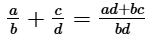
Basic Fraction Operations and Formulas
- Addition:
- Subtraction:
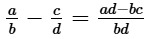
- Multiplication:
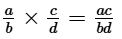
- Division:
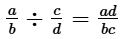
Real-World Usage Scenarios
- Culinary Scaling - Recipe Adjustments - Professional chefs and home cooks use this tool to scale recipes. If a recipe calls for 3/4 cup of flour and you need to triple it, the calculator quickly determines the total (2 1/4 cups) without manual arithmetic errors.
- Construction and Woodworking - Imperial Measurements - Carpenters often work with fractional inches. This tool simplifies adding or subtracting lengths like 5/8" and 11/16", ensuring structural precision and reducing material waste in projects using imperial units.
- Academic Verification - Mathematics Education - Students and educators use the calculator as a verification step for complex fraction operations involving mixed numbers and improper fractions, ensuring the manual simplification process matches the Greatest Common Divisor (GCD) result.
- Financial Ratio Analysis - Stock Fractions - Investors calculating equity distribution or dividend ratios use the tool to handle fractional shares, ensuring accurate distribution when dealing with non-integer financial units.
Frequently Asked Questions
How should I format a mixed number for calculation?
Enter the whole number followed by a space and then the fraction. For example, for one and three-quarters, type '1 3/4'. The tool will process this as a single value.
Does the calculator automatically reduce fractions to their simplest form?
Yes. Every result is automatically simplified using the greatest common divisor. You will see both the simplified improper fraction and the mixed number representation.
Can I perform operations with negative fractions?
Yes. You can enter negative values for integers, proper fractions, or mixed numbers (e.g., -1/2 or -2 1/4). The calculator follows standard algebraic rules for signs.
What happens if I try to divide by zero?
Division by zero is mathematically undefined. The calculator will display an error message if the denominator of a fraction or the entire second operand in a division operation is zero.